Private mobile CRM and business apps
A private app that runs your company the way you already work.
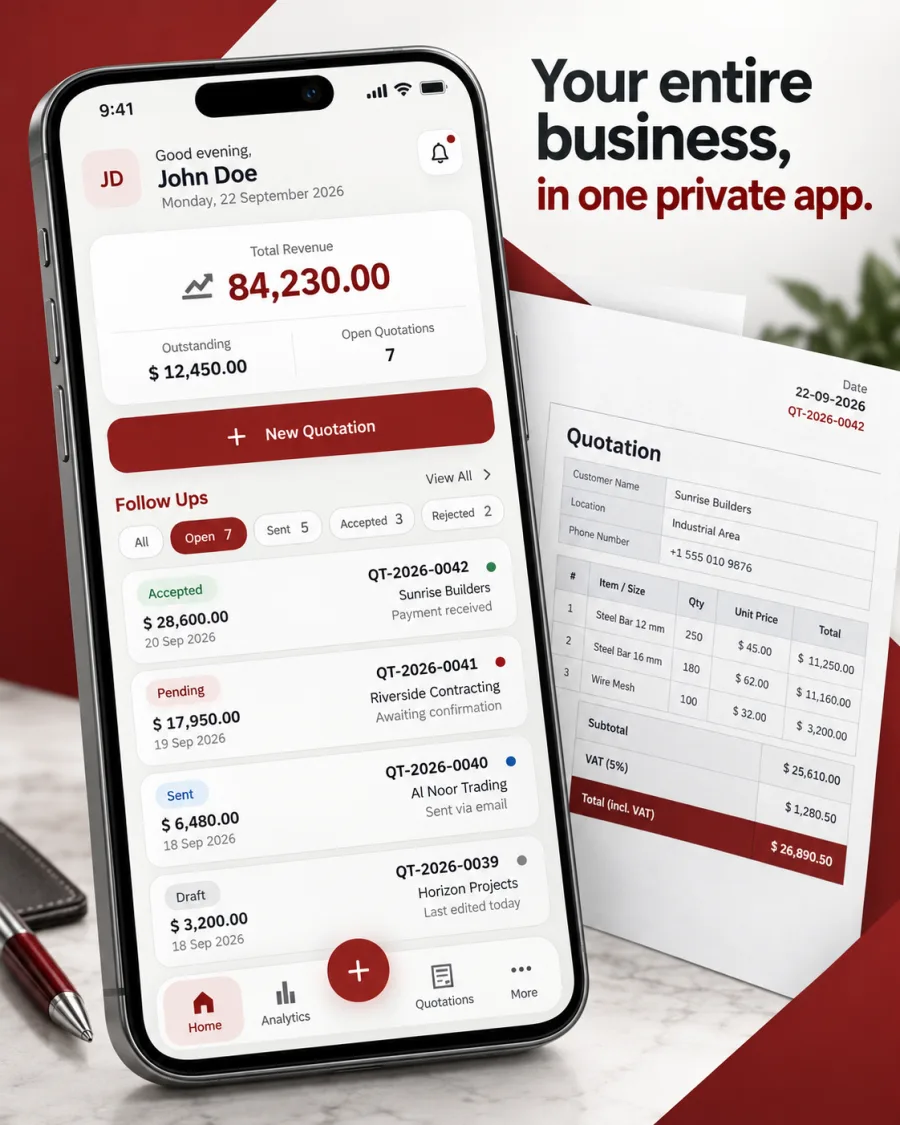
Customers, quotations, follow-ups, payments, and reports in one private mobile CRM that only you and your team can open. We build it around your workflow, and it stays in your company's name.
The cost of the current way
If one of these happened this month, the way you work today is already costing you.
- 01
A quotation went out with an old price.
The price list on one laptop was not the one on the other, and the customer holds you to the number you sent.
- 02
A customer asked about their order, and nobody could answer.
The answer took three phone calls and a long search through WhatsApp chats.
- 03
You could not say how much your customers owe you.
The number exists, but it sits in the accountant's file and reaches you days later.
- 04
An employee left, and their customer history left with them.
Months of conversations and agreements were on a personal phone, not in a record your company owns.
- 05
You opened a second branch, and the notebook stopped working.
What one person could track from memory now needs a system that every branch can see.
- 06
Decisions waited until you were back at a laptop.
You spend the day on sites and in branches, while your tools only work at a desk.
Inside the app
From the first quotation to the last payment, on one phone.
 02
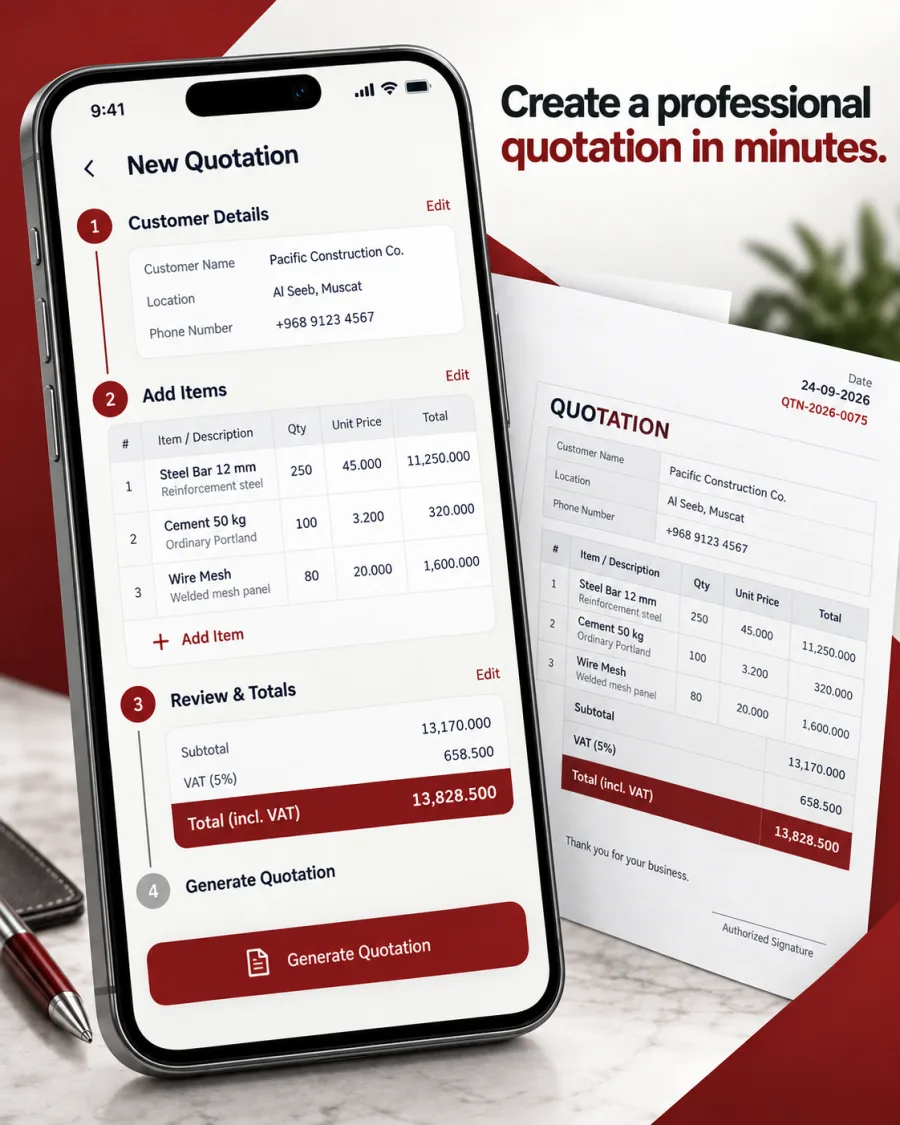
02A professional quotation from your phone.
Add the customer and the items, and the app calculates tax and totals and issues a finished document with your logo, ready to send.
- Enter a quantity or an amount, and the app works out the rest
- Totals and tax update as you type
- One document for the customer, and another for the supplier
 03
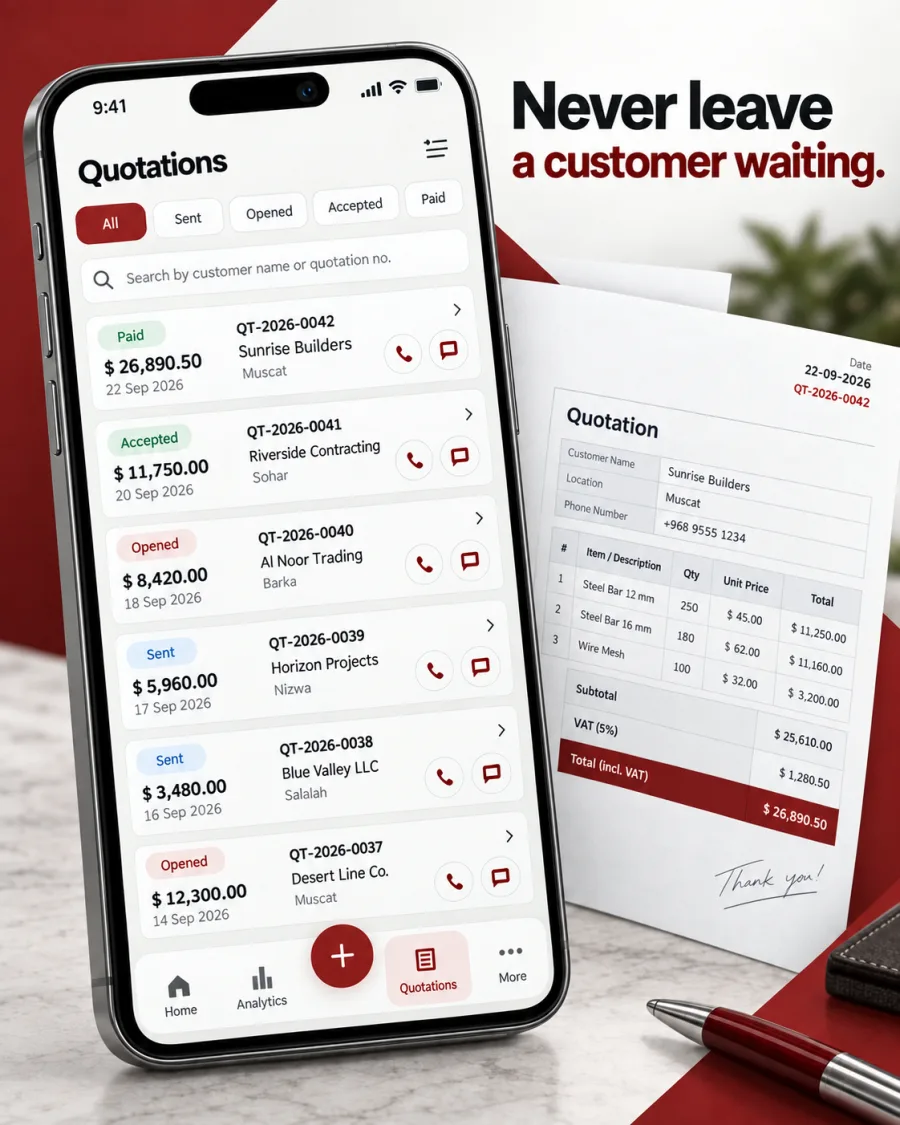
03Every quotation has a status, and every customer is one tap away.
See what is waiting, what was accepted, and what needs a call today, then call or message the customer from the same screen.
- Draft, sent, accepted, delivered, and paid
- A list of what needs attention today
- Call or WhatsApp from the quotation itself
 04
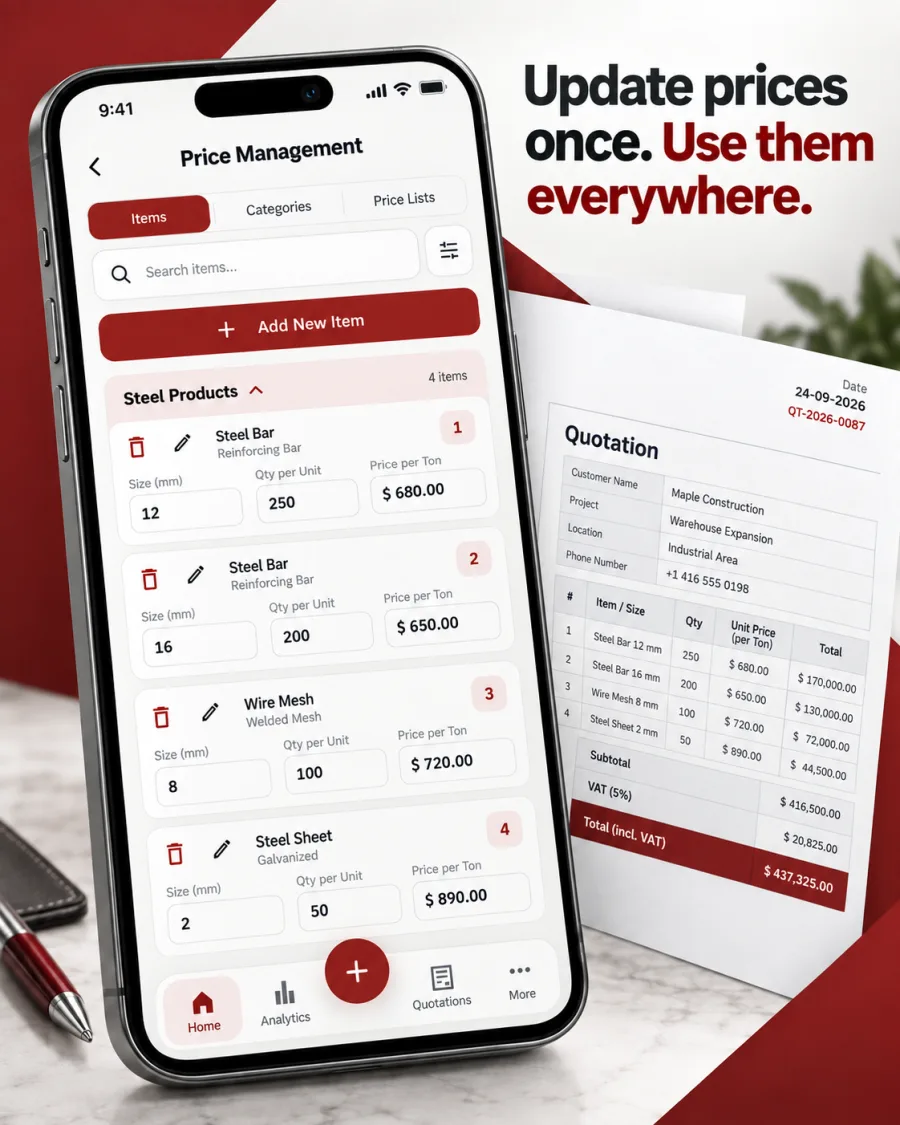
04Update prices once, and every new quotation uses them.
The price list lives in one place. The team always quotes today's price, and past quotations keep the price they were sent with.
- One price source for the whole team
- A record of every price change
- Per-line adjustments when a customer needs one
 05
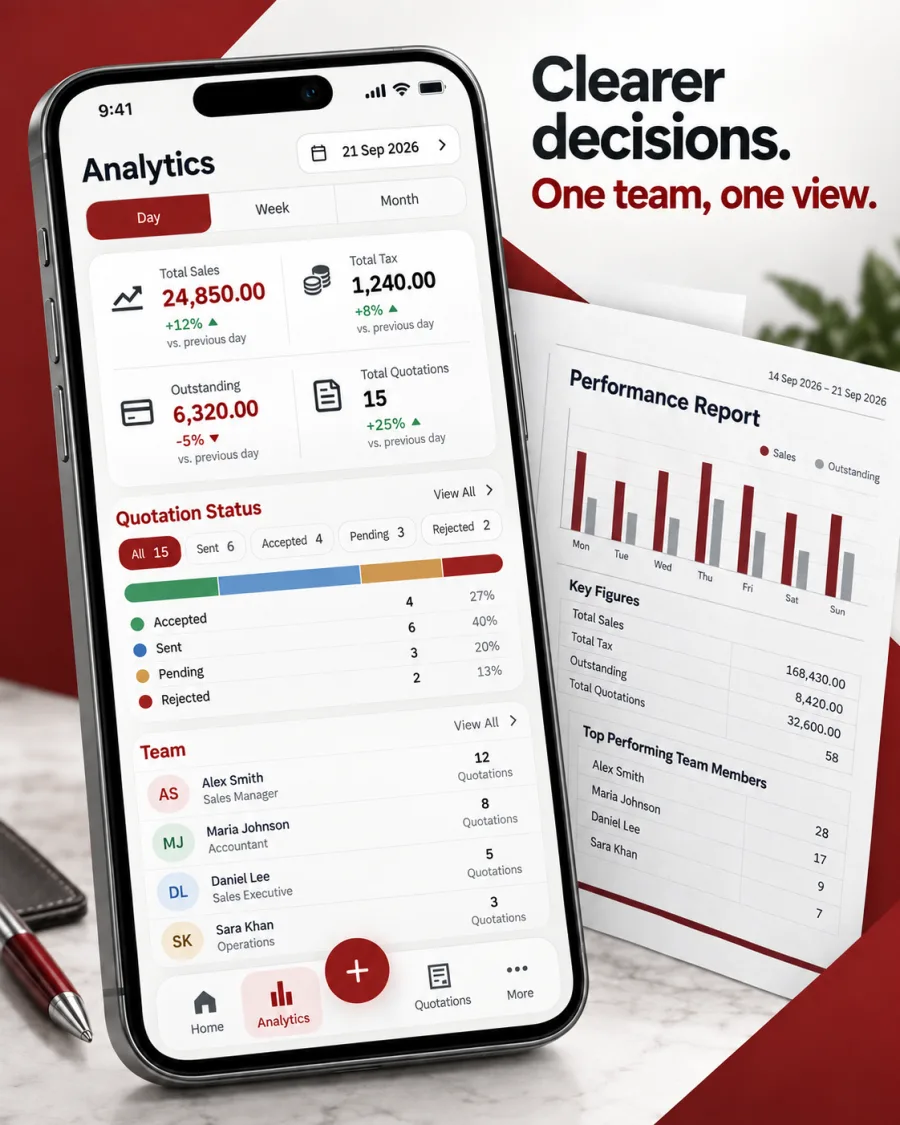
05You see the numbers, and the team works from the same picture.
Sales, outstanding amounts, quotation performance, and team activity in one dashboard on your phone.
- What was quoted, accepted, and collected in any period
- Your top customers and what they owe
- Who did what, and when
 06
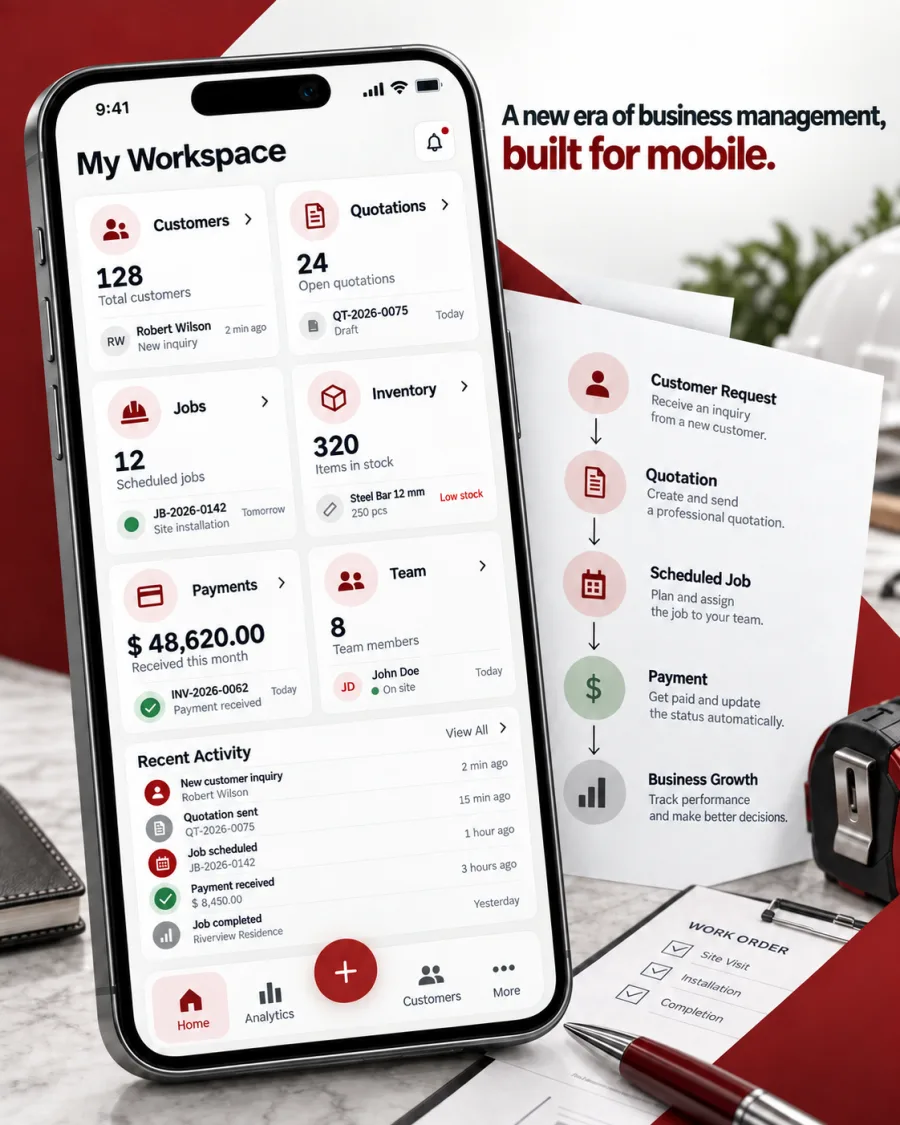
06Modules and terms set up for your industry.
Customers, quotations, jobs, inventory, payments, and team, arranged for contractors, distributors, service companies, and maintenance teams.
- Your words on every screen
- Only the modules your work needs
- New modules added as the business grows
Screens show sample data.
One quotation, before and after
What changes when the work moves into its own app.
Based on an app we built for a steel supplier in Oman.
Before
- The quotation is typed by hand into a spreadsheet.
- A screenshot of it is sent to the customer on WhatsApp.
- The order to the supplier is written again from the start.
- Acceptance, delivery, and payment are followed from memory and chat history.
With a private app
- The owner prepares the quotation on the phone in four steps: customer, items, delivery site, and review.
- Enter tons, pieces, or an amount, and the app calculates the other two and the total with tax.
- Two documents are issued at once: a quotation for the customer with prices, and a supply order for the mill without them.
- Both are sent from the company's WhatsApp number, and the app shows when they are delivered and read.
- Every job moves from draft to paid in clear steps, and the outstanding balance updates itself.
A private mobile CRM
It is a CRM. It belongs to you, and it goes further than the sale.
Customers and history
Every customer, contact, site, note, and balance in one record the whole team can see.
The sales pipeline
Quotations move from draft to sent to accepted, so you always know what is open and what is won.
Follow-ups
A daily list of quotations waiting for a reply and customers waiting for a call.
Beyond the sale
Where a general CRM stops at the deal, the record here continues into delivery, payment, and collection.
No fee for every seat
Add your whole team without a monthly charge for each user.
The same core becomes a sales CRM, a service CRM for field teams, or an operations app for branches.
- 01Draft
- 02Sent to the customer
- 03Accepted
- 04In delivery
- 05Delivered
- 06Paid
Every step is recorded with who moved it and when.
What the app includes
We choose the modules your work needs, and leave out the rest.
- 01
Customers
Every customer with their contacts, sites, full history, and what they owe.
- 02
Quotations and documents
A step-by-step quotation with live totals, issued as an official PDF in Arabic and English with your logo and stamp.
- 03
Jobs and statuses
Each job has a clear status, and the app records who changed it and when.
- 04
Price list
One price list for the whole team, with a record of every change. Past quotations stay as they were when prices change.
- 05
Payments
Several payments per job, each with its receipt, and an outstanding balance that calculates itself.
- 06
Map
Active jobs and delivery sites on a map, filtered by status and date.
- 07
Team and branches
Accounts you create for each employee, permissions by role, and separate data for each branch.
- 08
Checklists and handovers
Daily tasks, inspections, shift handovers, and low-stock alerts for each branch.
- 09
WhatsApp
Documents and updates sent from your company's WhatsApp number, where your customers already are.
- 10
Reports
Sales, collections, and top customers for any period, with an export file for your accountant.
What private means
Nobody gets into the app without an account you created.
- There is no public sign-up. You add every user, and you can switch any of them off in one step.
- Each person sees only what their role allows, down to each record.
- Every change is logged with who made it and when.
- Receipts, site photos, and documents are stored privately and open through links that expire.
- Face ID or fingerprint unlocks the app after the first sign-in.
- The app, its source code, and your data are registered in your company's name.
Three ways to put it in your team's hands
- 01
A native app that is not listed in the store
Published on the App Store but reachable only through a direct link. It never appears in search results.
- 02
A native app on company devices
Installed through Apple Business Manager or managed Google Play on the devices your company enrolls.
- 03
A web app on the home screen
Opened in the browser and added to the home screen, with no store involved. It suits shared tablets in a branch.
Built for the people who use it
Designed for the person on site, not the person at a desk.
Arabic first
Screens are designed right to left from the start, with English available to every user who needs it.
A PIN where email is a barrier
In a system we built for a restaurant group, staff choose their branch and name and enter a four-digit code. No email is needed.
Works when the signal drops
Lists open from the phone's memory and drafts are saved at every step. Saving new work waits for a connection, and the app says so clearly.
WhatsApp stays
Your customers keep using WhatsApp. The app sends through it and keeps the record inside your company.
From our work
Every platform we have built has a private app behind it.
The screens customers never see are the ones business owners work on every day.
T-CODE
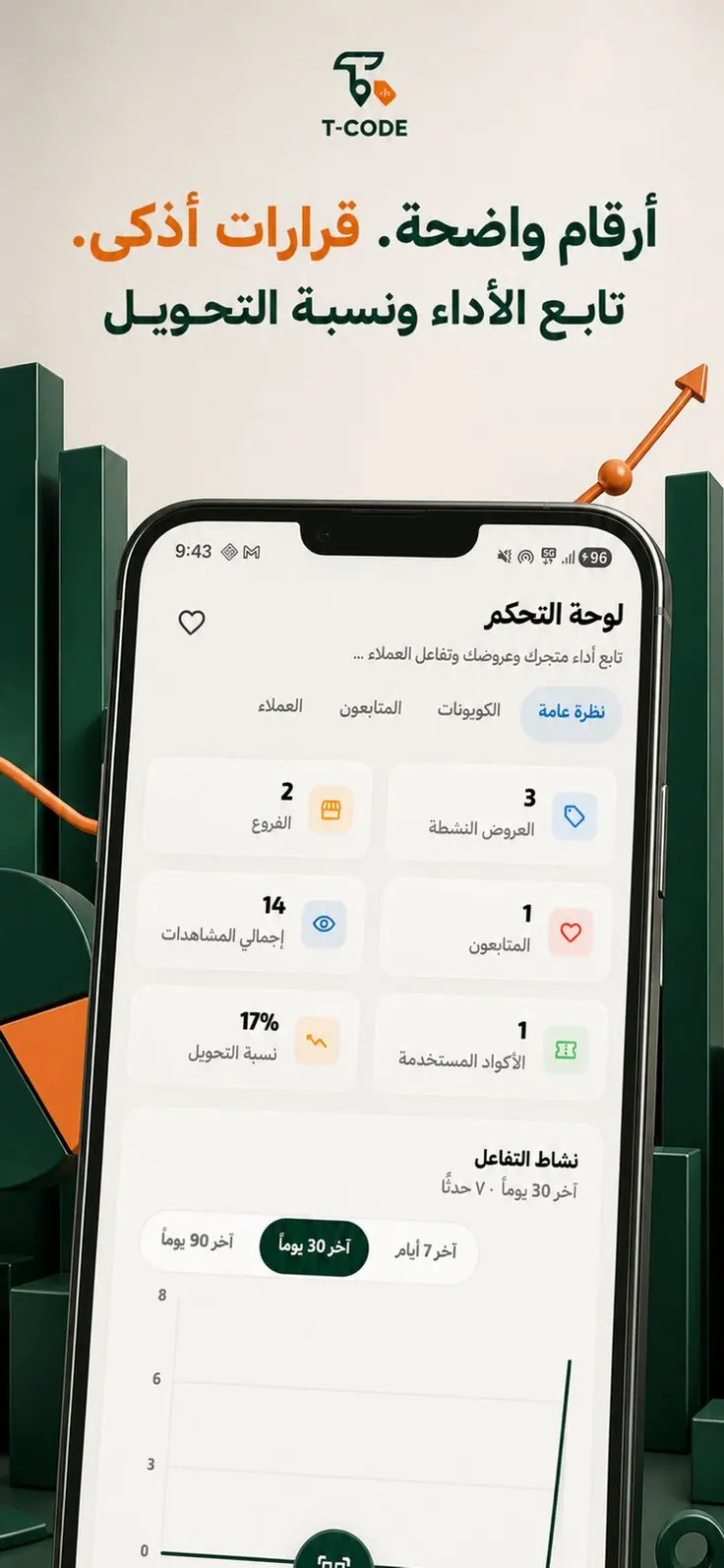
The merchant side of T-CODE: branches, offers, views, followers, used codes, and conversion in one view.
View the project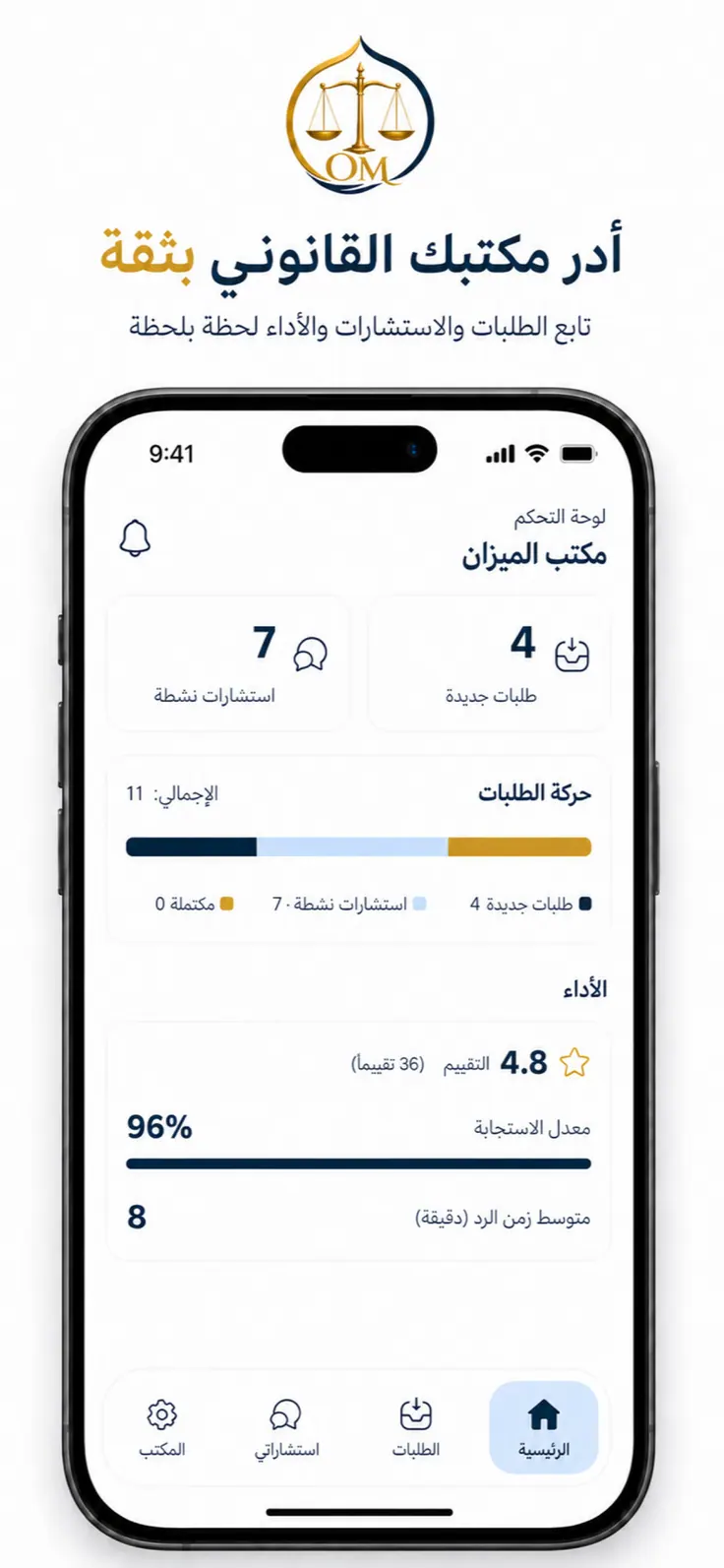
AlMizan
The law office side of AlMizan: new requests, active consultations, response rate, and average response time.
View the project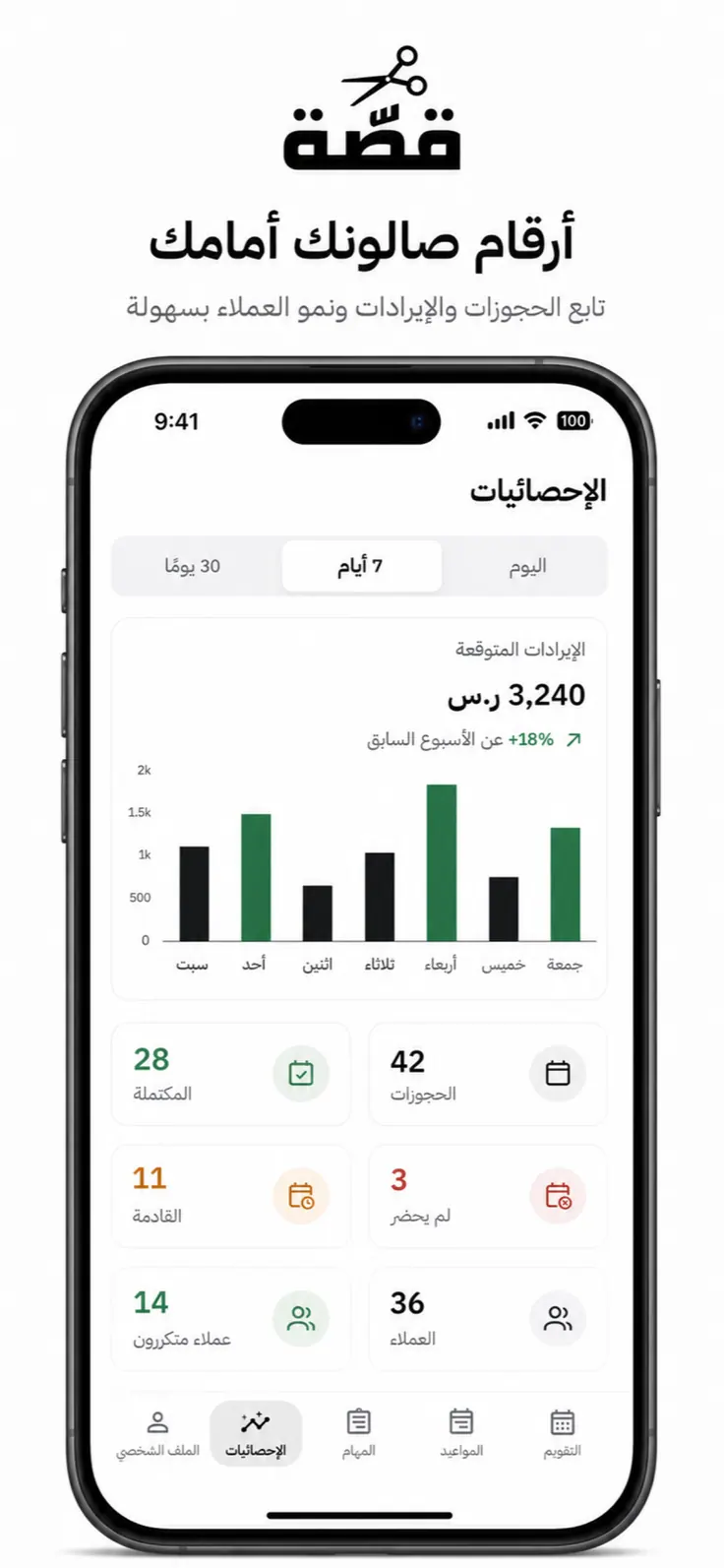
Qassah
The salon side of Qassah: revenue, completed visits, and customers by day, week, or month.
View the project
Screens show demo data.
Where it fits
The same approach, built around different kinds of work.
Contracting suppliers and building materials
Quotations, supply orders, deliveries to sites, and collections.
Trading and distribution
One price list, customer balances, and orders taken in the field.
Maintenance and field service
Work orders, visits, a photo for every completed visit, and each technician's day.
Multi-branch restaurants and cafés
Daily checklists, food safety, waste, shift handovers, and stock alerts.
Clinics and salons
Appointments, staff calendars, and the numbers behind them.
Transport and logistics
Driver approvals, roles and permissions, complaints, and reports.
An honest comparison
What you use today, what you could subscribe to, and what we build.
| Spreadsheet and WhatsApp | Accounting software | General CRM | A private app by FLUIDS | |
|---|---|---|---|---|
| Built around your steps and your terms | Only as far as one file allows | You adapt to its screens | Configurable within its model | Yes, from the first screen |
| One record of every customer and job | Spread across files and chats | For invoices and accounts | For the sales pipeline | For the whole operation |
| Designed for the phone first | WhatsApp only | Usually a desktop system with an app | Usually a desktop system with an app | Yes |
| Accounting, VAT, and e-invoicing | No | Yes, this is its purpose | No | Works beside your accounting system |
| Who owns it | You, as scattered files | The provider, while you subscribe | The provider, while you subscribe | Your company |
| How you pay | Free, until something is missed | Monthly, by plan | Monthly, per user | One build, then running costs |
When we will tell you not to build one
- If your work fits an off-the-shelf tool with a modest monthly subscription, use that tool.
- If you work alone and issue a handful of quotations a month, a spreadsheet is enough.
- If what you need is accounting and e-invoicing, subscribe to an accounting system. A private app can work beside it.
Keep your accounting software for accounting. Put the rest of the business in an app that works the way you do.
How we build it
From a map of your work to an app your team uses.
- 01
Map the workflow
We sit with you and draw how a quotation, a job, or a shift runs today, then mark what the app should replace.
- 02
Agree the first version
Usually four to six modules. You receive a written plan with the scope, timeline, and price before any work starts.
- 03
Design and build
You receive a version to try on your own phone every week, and we adjust it to how your team actually works.
- 04
Hand over and grow
The app, the code, and the data are handed over in your name. New modules are added in later phases when you need them.
Questions
What owners ask before they decide.
Is this a CRM?
Yes. It covers what a CRM covers: customers, the sales pipeline from quotation to acceptance, follow-ups, and team activity. It then continues into delivery and collection. The difference is that it is built around your steps, runs on the phone first, and belongs to your company.
Why pay for a build when a subscription costs a small monthly fee?
Because a subscription asks your work to fit its screens. If your work fits, we will tell you to subscribe. If it does not, the cost shows up as the spreadsheet kept beside the subscription, the quotations written twice, and the follow-ups that slip. A private app is built once around your steps and belongs to your company.
Who owns the app and the data?
Your company. The store listing, the source code, and the data are registered in your company's name. If you stop working with us, the app stays yours.
Who can see our data?
Only the accounts you create. Each user reaches only what their role allows, files are stored privately, keys to outside services stay on the server and never inside the app, and every change is logged. We design around Saudi Arabia's Personal Data Protection Law from the first screen.
Our staff will not use a new app.
Then the app has been designed wrong. We design for the person on site: Arabic first, large buttons, few fields, and a PIN where email is a barrier. WhatsApp also stays, because your customers already use it.
Does it replace our accounting software or e-invoicing?
No. The app handles the work that happens before the invoice: customers, quotations, jobs, deliveries, and collections. It exports to your accountant or connects to the accounting system you already use for invoicing and VAT.
Does it have to be on the App Store?
No. It can be a native app that opens only through a direct link, an app installed on company devices, or a web app added to the home screen. In every case, nobody gets in without an account you created.
What happens when the internet drops?
Lists open from the phone's memory and drafts are kept. Saving new work needs a connection, and the app tells the user plainly instead of failing silently.
Can we change it after launch?
Yes. You edit prices, items, terms, and document templates yourself from the settings. Larger additions are planned as phases, for example a driver mode with live tracking once the first version is in use.
How much does it cost, and how long does it take?
It depends on the modules your work needs, which is why we start by mapping the workflow. After that session you receive a written plan with the scope, timeline, and price before any work starts. The first session is free and carries no commitment.
Do you work with companies outside Saudi Arabia?
Yes. We build for companies across the Gulf, and several of the apps we have built run in Oman.
Start with a one-page map of how your company works.
In one free session we draw how your quotations, jobs, or shifts run today and show you what a private app would replace. You keep the map whether or not you build with us.
Book the session on WhatsApp